
Forkgram
Screenshots
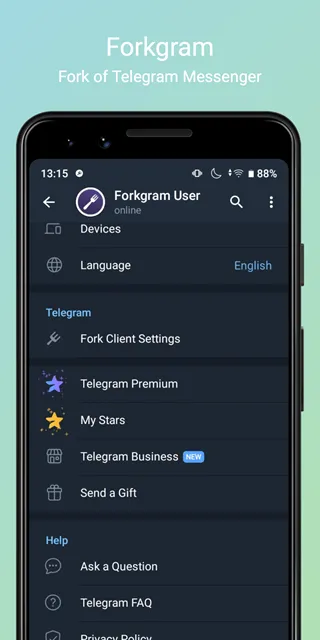
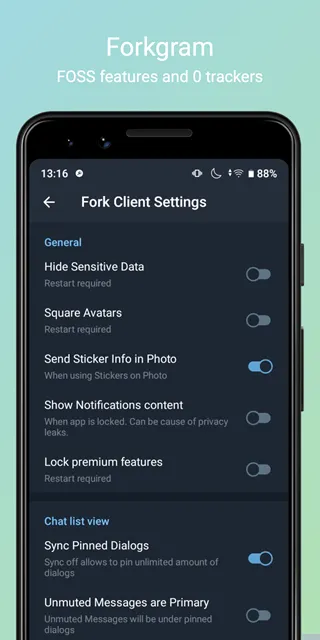
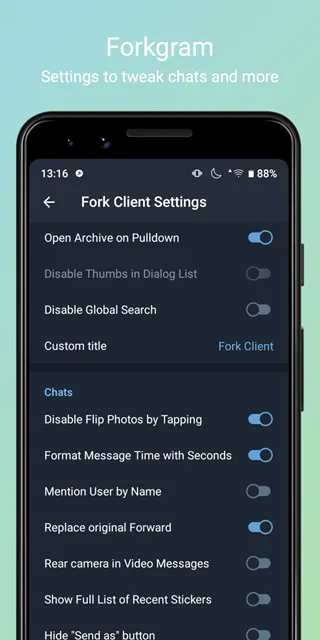
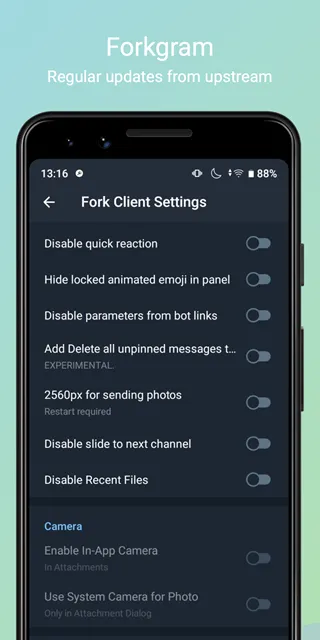
Forkgram is a modified messaging client that alters your daily chatting experience. Many users look for extra tools in their messaging apps. Therefore, independent developers created this modified option. The app relies on the open-source code of the official Telegram client. However, it adds many features that the original platform lacks. For example, you get better control over your chat privacy. You can also change the look of the interface completely.
Besides, the app runs smoothly on mobile devices. You do not need a paid subscription for these extra tools. Instead, you get full access to advanced features for free. This introduction guides you through everything the app offers. Then, you can decide to download the file safely.
What Is Forkgram and Why Do You Need It?
Forkgram provides an alternative way to connect with your friends. The official Telegram client is highly secure. However, it restricts certain user preferences. Therefore, this customized version fills those gaps. You can enjoy a clean interface without unnecessary limitations. For example, the app removes the floating pencil icon from your main screen. This change gives you more space to view your active chats. Additionally, the app modifies how you interact with basic tools. You get faster access to your saved items.
Furthermore, you can manage large groups more effectively. Many people switch to this client because it respects user freedom. It does not force you to use specific layout styles. Instead, you choose how everything looks and behaves. Consequently, your daily messaging becomes much more efficient. You can connect your existing account in seconds. Then, you can explore the advanced settings immediately. Many open-source forks exist today. However, this one remains very close to the original code. This means you get all new security patches quickly. Therefore, your account stays perfectly safe while you use these unique adjustments.
Key Features of This Customized Messaging Client
Messaging apps should make communication simple. This app introduces several tools to improve your conversations. For instance, the app enables the delete for everyone option by default. Therefore, you do not need to check a box every time you remove a message. This small change saves a lot of time during fast chats. Besides, you can view the original date of forwarded messages. This feature helps you track when someone shared information first.
Furthermore, you can see the full number of subscribers in any public channel. Standard clients often round these numbers up or down. However, this client gives you the exact count instantly. You can also jump to the first message of any chat with one tap. This tool is great for checking old shared files. Consequently, you spend less time scrolling through endless text threads.
Here is a list of the main chat tools you get:
- Default deletion of messages for all chat participants.
- Original timestamps on your forwarded content.
- Exact subscriber counts for channels and large groups.
- One-click navigation to the start of any conversation.
- Quick audio controls to skip forward or backward.
These tools make your daily messaging much faster. Then, you can focus on your important conversations. Visual presentation also changes how you enjoy a messaging app. This modified client offers deep visual changes for your screens. For example, you can switch from round avatars to square avatars. Many users prefer this classic look because it fills the screen better. Besides, you can change the title text of your main screen easily.
You can remove animated premium emojis if they distract you. Therefore, you create a peaceful environment for reading your text threads. Additionally, you can raise all unmuted chats above muted ones. This layout option ensures you never miss an urgent text. You can also hide chat titles or profile pictures in your main list. This option creates an ultimate minimalist design for your daily use. Consequently, the app conforms to your exact personal taste.
How Forkgram Improves Your Account Privacy Settings
Forkgram focuses heavily on user privacy. Privacy matters a lot when you share personal information online. Therefore, the app includes hidden options to protect your data. For example, the app disables contact syncing by default during setup. This means the app does not upload your phonebook to external servers automatically. Instead, you control which contacts you want to add manually. Additionally, you can hide your account name from the side drawer menu.
This protects your identity if someone looks at your screen. Furthermore, you can remove sticker data from the photos you send. Consequently, other users cannot track the exact sticker packages you use. The app also hides the proxy connecting string on your screen. This creates a cleaner look and secures your connection details. Finally, you can use advanced colored online statuses to monitor activity accurately.
The privacy tools include the following options:
- Disabled automatic contact synchronization during your first login.
- Hidden profile names in the main navigation menu.
- Complete removal of extra metadata from your media files.
- Hidden connection lines when you use custom proxy servers.
- Advanced status dots to show recent online activity.
These features give you peace of mind. Therefore, your personal chats remain completely confidential. You can access these settings inside the specialized debug menu. To open it, perform a long press on the version string twice. Then, a new menu unlocks hidden controls for your account safety. This layout keeps sensitive toggles away from accidental clicks. Consequently, you maintain full authority over your data.
Steps to Safe Installation of the Forkgram APK
Installing the Forkgram APK requires a few simple steps. You need to get the file from a secure source. Our site provides clean installation files for your peace of mind. However, you must prepare your device settings first before opening the file. Follow this guide to complete the installation smoothly.
- Enable Unknown Sources:
- Open your device settings menu. Then, locate the security or privacy section. Enable the option to allow installations from unknown sources.
- Download the APK file:
- Click the secure download button on our website. Wait for the file to save to your local folder. Ensure your internet connection stays stable.
- Open the downloaded file:
- Launch your local file manager. Then, find the downloads directory. Tap on the specific file to begin the setup process.
- Confirm the installation:
- A security prompt will appear on your screen. Tap the install button to confirm your choice. The process completes in a few seconds.
- Log in to your account:
- Launch the newly installed app. Then, enter your existing phone number. Enter the verification code to access your chats safely.
These steps ensure a successful setup. Always make sure you have enough storage space on your device. For instance, the file requires a few dozen megabytes. Consequently, clearing old cache files helps the process run better. If you have an older version, uninstall it first. This prevents package conflicts during the update. Then, you can enjoy the modified features immediately.
Conclusion and Final Verdict
In conclusion, choosing a messaging client affects how you communicate every day. This app offers a wonderful balance of security and freedom. You get all the core benefits of a secure network. At the same time, you escape the annoying restrictions of the standard client. For example, you can customize your interface with square avatars and clean side menus. You can also hide your online details to protect your personal privacy. These features are completely free to use. Therefore, you do not need to purchase expensive premium subscriptions.
Our download page offers a safe and fast way to get the file. We verify every file to protect your mobile device from harm. Take control of your chat experience right now. Download the latest version from our secure servers today. Then, see the difference in your daily conversations. Choosing between clients depends on your personal daily needs. The official option provides regular updates directly from the main company. However, it blocks many user tweaks and power tools.
This modified option gives you those missing features instantly. For example, the official client limits how many chats you can pin to the top. This client lets you pin an unlimited number of chats easily. Besides, the standard client forces you to use the built-in camera layout. This app lets you disable the internal camera completely. Instead, you can use your phone’s native camera app for better photo quality.
Furthermore, you can forward media files as plain data without original captions. The official client makes this process much more complicated. Therefore, advanced users prefer the modified version for their daily workflows. It simply offers more flexibility for managing large amounts of text. Additionally, the software runs well on older hardware. It optimizes memory usage by blocking heavy background processes. Consequently, your phone battery lasts longer throughout the day.
- Meta Horizon
- TikTok Pro
- HeeSay
- Samsung MultiStar
- Telegram Beta
- Proton Mail
- Google Chat
-
SuperLive
 Download
SuperLive- Live Stream & Chat
SuperLive connects people through real-time video streaming....